



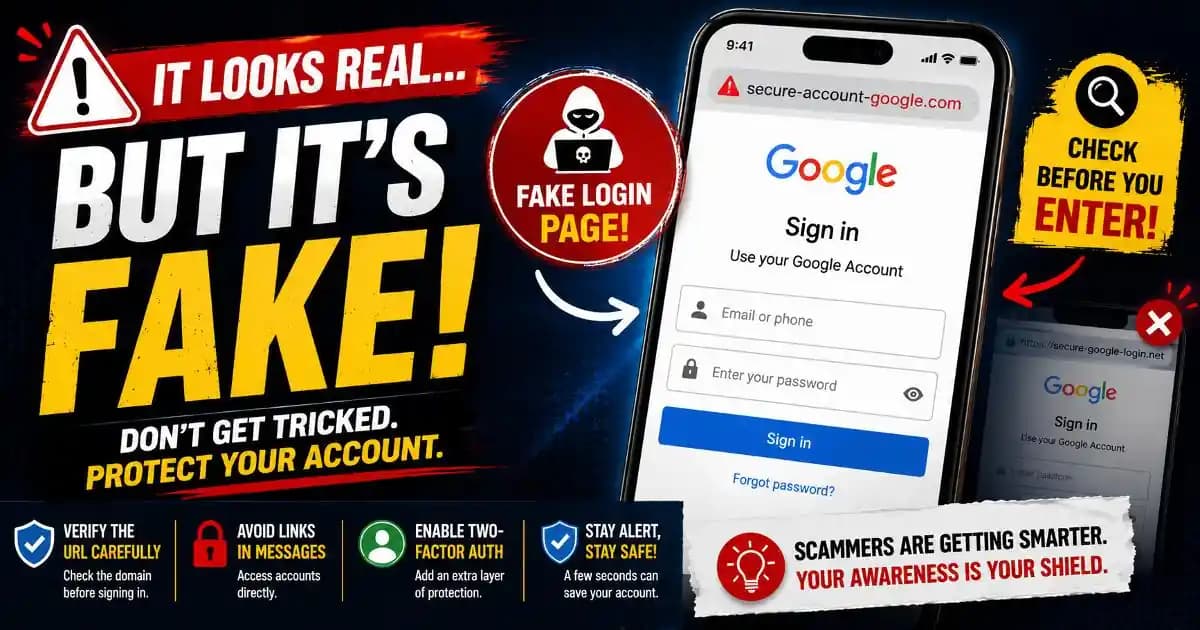
Fake login page scams often begin with a moment that feels completely ordinary. A user opens an email, taps a notification, or clicks a shared link expecting to sign in normally. The page looks familiar, the logo appears correct, and the login form behaves exactly the way users expect.
That sense of familiarity is what makes phishing attacks so effective today.
Modern fake login page designs are no longer crude copies filled with spelling mistakes and broken graphics. Many now imitate real services with remarkable accuracy. Some replicate banking apps, cloud storage platforms, social media services, email providers, streaming accounts, or workplace collaboration tools almost perfectly.
For many users, the fake page feels trustworthy because it matches something they have already seen hundreds of times before.
That is exactly the goal.
Why Familiar Design Creates Instant Trust
Most people do not study login pages carefully. Signing in has become automatic behavior.
Users type passwords while distracted, multitasking, traveling, or switching quickly between apps. On mobile devices, actions happen even faster. A familiar logo, recognizable colors, and a clean login box are often enough for the brain to assume the page is legitimate.
Attackers understand this deeply. Modern phishing campaigns are designed around behavioral shortcuts instead of only technical tricks.
When users see a page that resembles Google, Apple, Microsoft, Meta, or a banking platform, the brain tends to trust the visual pattern before checking details like URLs or domain spelling.
This psychological habit has become one of the biggest weaknesses exploited in phishing protection failures during 2025 and 2026.
How Fake Login Pages Became More Convincing
Earlier phishing attempts were easier to recognize because they often looked poorly made. That has changed significantly.
Today, attackers can copy website layouts, authentication prompts, button styles, fonts, animations, and mobile-responsive designs within minutes. Some phishing kits even duplicate entire login systems automatically.
Artificial intelligence tools have also helped scammers produce more believable language and localized interfaces. A fake sign-in page can now appear professionally translated and visually polished enough to resemble official services closely.
On smartphones, the problem becomes even harder to detect. Small screens hide full URLs, browser bars collapse while scrolling, and many users focus only on the visible login form instead of the actual website address.
This combination of realistic design and mobile browsing behavior makes modern phishing pages extremely persuasive.
The Goal Is Usually Credential Theft
Most fake login page scams are designed to steal credentials directly.
When a user enters an email address and password into a phishing page, the information is usually sent immediately to attackers. In many cases, the fake site then redirects the victim to the real service afterward, making the login failure appear harmless or temporary.
Some advanced phishing systems also capture multi-factor authentication codes in real time. Others attempt session hijacking techniques that allow attackers to bypass traditional login protections entirely.
This is why identity protection now depends heavily on user awareness alongside technical security systems.
The danger is rarely the page itself. The danger comes from what attackers can access afterward: email accounts, password reset systems, cloud storage, banking services, work platforms, messaging apps, and connected identities.
Why People Often Miss the Warning Signs
Many users assume they would immediately recognize a phishing page, but real-world behavior is more complicated.
Urgency changes attention. A message claiming an account was locked or suspicious activity was detected can pressure users into acting quickly without careful verification.
Some attacks also arrive through realistic contexts. A fake login page may appear after clicking a shared document, opening a fake invoice, responding to a security notification, or accessing what appears to be a legitimate collaboration request.
Because the action feels expected, suspicion drops naturally.
Even experienced users sometimes overlook subtle domain changes like missing letters, additional words, unusual country extensions, or deceptive subdomains.
Cybersecurity experts increasingly emphasize that phishing attacks target normal human behavior, not only inexperienced users.
Mobile Devices Changed the Risk Completely
Phones transformed how users interact with websites.
On desktop computers, users could often inspect browser details more easily. On mobile devices, login flows are faster and more compressed. Notifications open directly into browsers or apps, passwords autofill instantly, and URLs are harder to inspect carefully.
This environment benefits attackers significantly.
Some phishing pages now imitate mobile app interfaces instead of traditional websites. Others abuse app permission systems, deceptive browser notifications, or fake verification screens.
App permission abuse has become particularly concerning because certain malicious apps can display overlays that resemble legitimate sign-in prompts.
The result is growing confusion between authentic authentication systems and imitation interfaces.
Why Verification Habits Matter More Than Fear
One of the biggest mistakes users make is reacting emotionally instead of verifying calmly.
Attackers depend heavily on urgency. A fake warning about account suspension or suspicious login activity is designed to reduce skepticism long enough for the victim to enter credentials quickly.
Slowing down changes the situation entirely.
Opening the official app directly instead of tapping a link often prevents phishing attacks immediately. Checking the domain carefully, reviewing browser security indicators, and questioning unexpected login requests create powerful layers of protection.
Many security organizations also recommend using password managers because they usually recognize legitimate domains automatically. If autofill suddenly fails on a familiar service, that inconsistency itself can act as a warning sign.
Digital literacy increasingly depends on recognizing behavioral manipulation, not only understanding technical cybersecurity concepts.
The Future of Phishing Looks More Human
Modern phishing attacks increasingly imitate natural online experiences instead of obviously malicious behavior.
The goal is to make the fake login page feel emotionally routine. Users are less likely to question something that resembles their daily habits.
This shift means awareness matters more than ever. Not because users should become paranoid, but because small verification habits now play a critical role in account security.
The safest users are often not the most technical people. They are usually the people who pause long enough to verify what they are seeing before entering sensitive information.
Frequently Asked Questions
What is a fake login page?
It is a phishing website designed to imitate a real sign-in page in order to steal passwords or account credentials.
Why do phishing pages look so realistic now?
Attackers copy real website designs, branding, layouts, and authentication systems very closely.
Can fake login pages appear on phones?
Yes. Many phishing attacks specifically target mobile users because smaller screens make detection harder.
How can users verify a login page safely?
Open the official app or website directly instead of using links from messages or notifications.
Do password managers help against phishing?
Yes. Many password managers detect domain mismatches and refuse to autofill credentials on fake websites.





